How to keep an AI character consistent in video
If you have tried to make more than one shot of the same character with AI video, you already know the failure. Shot one looks right. Shot two, the jacket has shifted colour. Shot three, the prop has vanished and the haircut has changed. The model is not remembering your character between shots — it is re-inventing her from your description each time, and a description has a lot of room in it.
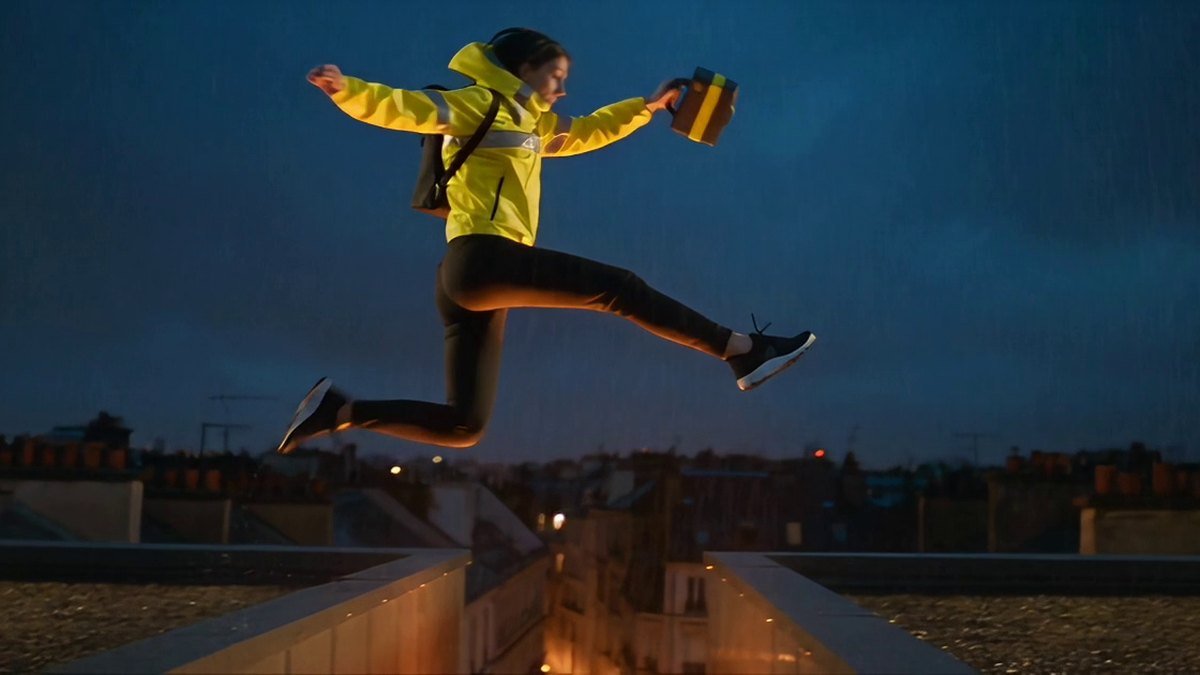
The fix is not a longer prompt. It is to stop describing the character and start showing her. This article is the method, and the test that put it under real load: a single AI render of the hardest beat in a short film, scored frame by frame, with the parts it got wrong stated as plainly as the parts it got right.
Why word-described characters drift
A written character description is a set of constraints with enormous slack between them. "Short dark hair" covers a bob, a crop and a shag. "Yellow jacket" covers a dozen yellows and every jacket construction there is. Each render samples somewhere inside that slack, independently. Nothing carries over, so nothing is stable.
Worse, the slack is not evenly distributed. The details most likely to move are the ones sitting lowest in your prompt and lowest in the model's attention — a hood that should stay down, a stripe placement, which hand a prop is in. Those are precisely the details a viewer uses to decide whether they are watching one person or two.
There is a second trap that looks like a fix and is not: using the last frame of your previous shot as the reference for the next one. That chains error. Any drift in shot two becomes the ground truth for shot three, and by shot five you are a long way from where you started, one small step at a time.
The reference-first workflow
The principle is one sentence: lock the character as images before you write a single shot, and hand those same image files to every render.
1. Build a character sheet, not a mood board
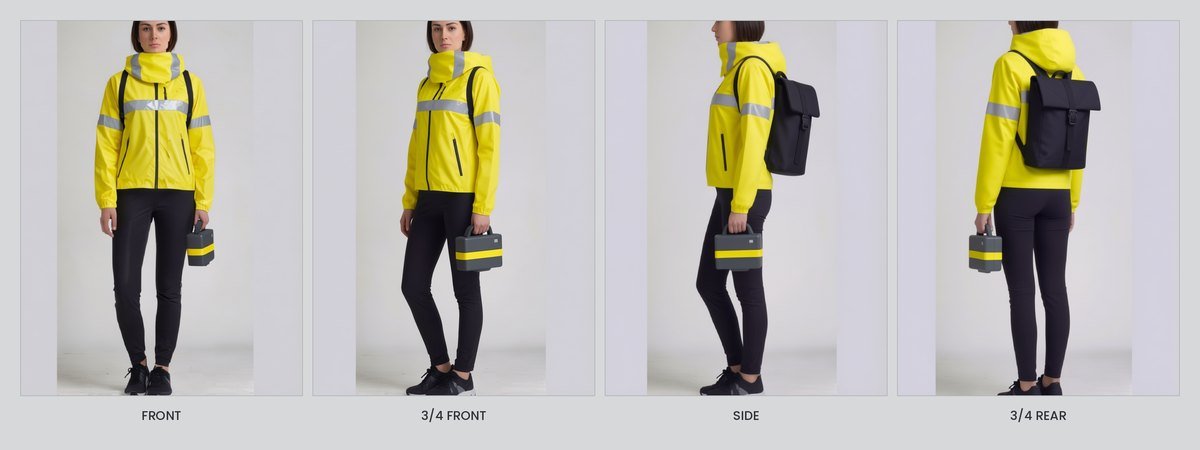
Three images, minimum: front, three-quarter front, and a clean side. Same lighting, same neutral background, same distance where you can manage it. Every non-negotiable visible in at least one of them.
A mood board is a feeling. A character sheet is a specification. If a detail matters and is not visible in any of the three, it is not locked, and you should expect to lose it.
2. Write the lock list
Before rendering, write the flat list of things that must not change. For the test below it was twelve items: same face, short dark hair, hood down, safety-yellow shell, silver chest stripe, silver forearm bands, plain black trousers, black trail shoes, black roll-top backpack, small matte-charcoal case, one yellow band on the case, case in the same hand — plus two negative locks: no generated lettering anywhere in frame, and no second person.
The list has two jobs. It tells you what to put in the references, and it gives you something objective to check against afterwards. "It looks about right" is not a check.
3. Hand the same files to every shot
Not a re-render of the reference. Not a similar picture. Not a frame pulled from the previous clip. The same files, every time. This is the whole mechanism — consistency comes from the input being literally identical, not approximately so.
4. Attack the hardest shot first
Identity breaks under action. A character standing still in soft light will survive almost anything; a character sprinting, jumping and landing is where a model starts improvising. Proving the calm shots proves very little, and it costs you renders you will have to redo anyway.
So render the hardest beat first. If it holds, the rest of the film is a scheduling problem rather than a research problem. If it does not, you have found that out at shot one instead of shot six.
5. Check frame by frame, and write down what deviated
Step the result through frame by frame against the lock list. Then — the step people skip — record what the model changed that you did not ask it to. If you do not write the deviation down, you will brief the next shot exactly the same way and be surprised by exactly the same thing.
The test: one shot, one render, no retry
The film is a seven-shot short called THE HANDOVER — a courier crossing a city at night with something she should not be carrying. Shot three is the rooftop leap: she runs off the edge of a wet roof, crosses a lit street gap, and lands on the far side.
Some exactness about what was tested, because this is where write-ups usually go soft:
- One shot was rendered. Shot three. The remaining six shots of the film have not been rendered at all. This is not a selection of the good one out of seven.
- One render. No retry. Not a best-of-twelve. The first and only attempt is what is being reported.
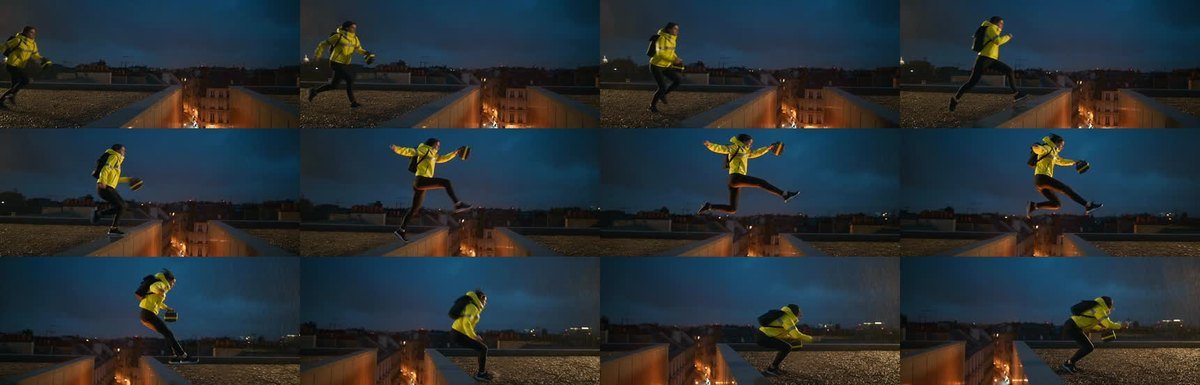
- Four seconds. 97 frames, 24 fps, 21:9. Every frame was reviewed.
- Three canonical reference images went in with it — front, three-quarter front, side — the same files described above.
What held
The short version is that the continuity is good, not perfect — and the two places it is not perfect are set out immediately after this. Across all 97 frames: the same woman, same face shape and features as the front reference, same short dark hair. The hood stayed folded at the neck in every single frame and never rose. The safety-yellow shell kept its colour and construction; the silver chest stripe was visible whenever the chest was to camera; the forearm bands held. Trousers, shoes and the black roll-top pack were unchanged, and the pack stayed attached through take-off, flight and landing. The small charcoal case with its one yellow band kept its size and form, was never dropped, and stayed in a single hand the whole way. No invented lettering appeared anywhere, including in the background skyline. One person in every frame, no cut, no teleport, no duplicated limb.
The physics held too, which matters more than it sounds: a real plant step at the edge, a plausible arc rather than a superhero one, knees that flex and take the weight on landing, and momentum that carries into the run-on. No floating, no foot sliding, no rebound.
What did not hold
The camera is not the camera that was asked for. The brief specified a low angle from below and across the gap. What came back is a side-on tracking shot at roughly her own height. It is a clean, legible choice for a four-second beat — arguably a better one — but it is not the specified angle, and the model did not flag that it had taken a view. Treat framing as a thing you verify, not a thing you assume.
The prop hand is consistent but not provable. The case stays in one hand for all 97 frames with no swap, and in a left-flank profile that reads as her left, matching the references. A pure side view cannot prove handedness beyond doubt. Consistent, yes. Proven, no.
One shot passing does not prove six more will. This is a single data point at the hardest beat. It is a good data point. It is not a finished film, and the six unrendered shots are still unrendered.
What to take from it
The reference-first workflow did the thing that four rounds of description-only attempts could not: the character arrived in motion as herself, in the right jacket, with the right prop in the right hand, hood down, and stayed that way through a physically committed action.
That is a method you can copy today, and it does not depend on which model you use:
- Character sheet before shot list — front, three-quarter, side.
- A written lock list of non-negotiables, including the negatives.
- The same reference files into every shot, never a chained frame.
- Hardest shot first.
- Frame-by-frame check against the list, and a written record of every deviation.
Doing this in Zappy
Zappy is built around this shape of work. You bring the idea and your reference images; Zappy handles the direction and selects an appropriate rendering engine underneath, so you are not assembling a pipeline to get one consistent character across shots. Costs are quoted before anything is generated, and Zappy includes free daily credits — around 25 a day — so you can try the workflow before paying for larger generations. A long take like the one above costs considerably more than a day's free allowance, so plan the free credits as a way to learn the workflow rather than as a way to render the film.
Start a story in Zappy Story Studio, or read the free AI video generator overview if you are new to the tools. If you are choosing between driving a shot from a still or from a written prompt, text-to-video vs image-to-video covers the trade-off directly — and reference-first is the image side of that argument.
Try the reference-first workflow free
Zappy includes free daily credits — around 25 a day — so you can build a character sheet and learn the workflow before paying for larger generations.
Open Story Studio